PHP ja json
<?php
$xml = simplexml_load_file("autod.xml");
$json = json_encode($xml, JSON_PRETTY_PRINT | JSON_UNESCAPED_UNICODE);
file_put_contents("autod.json", $json);
echo "Konverteerimine valmis Vaata faili autod json";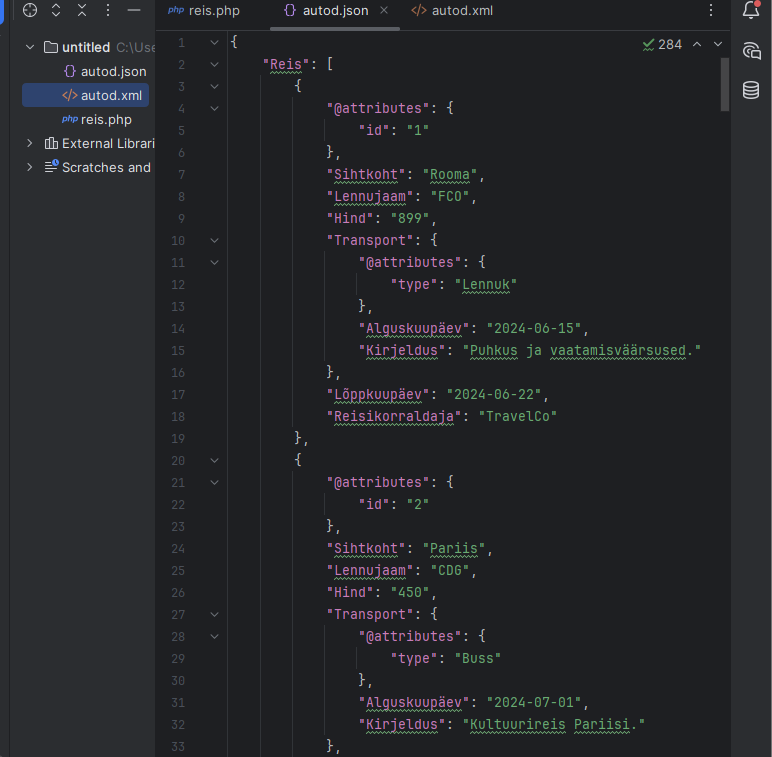
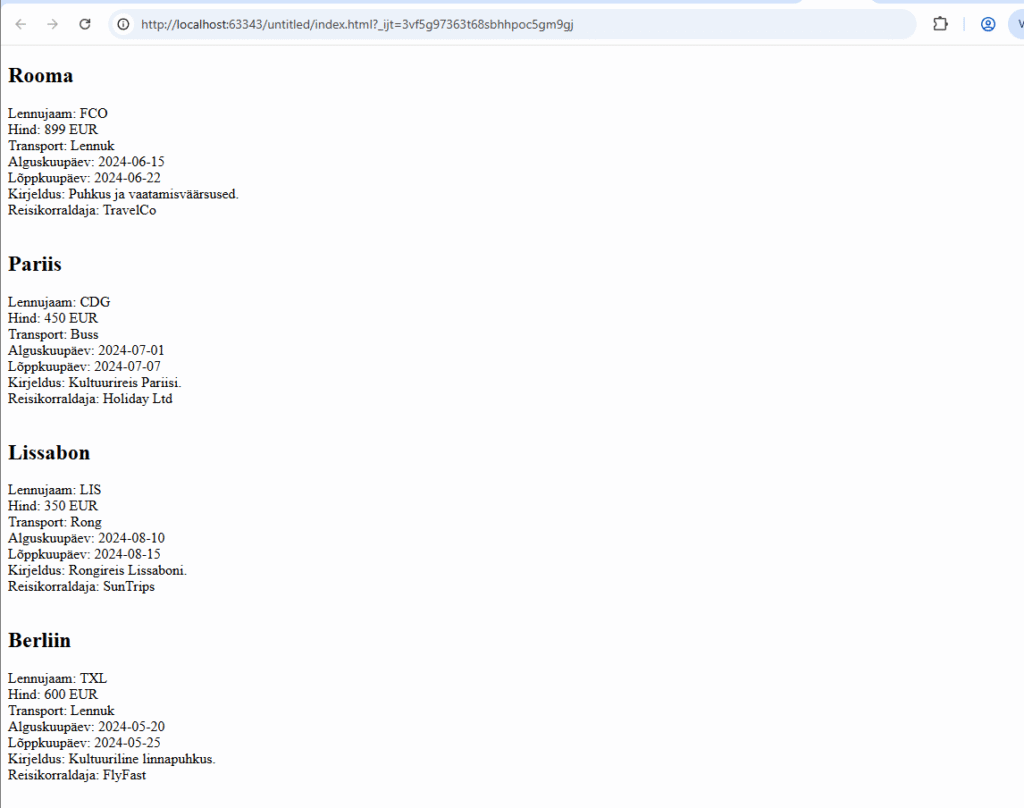
XML andmete lugemine jQuery abil
<!DOCTYPE html>
<html>
<head>
    <meta charset="UTF-8">
    <meta name="viewport" content="width=device-width, initial-scale=1.0">
    <title>jquery ja XML</title>
    <script src="//code.jquery.com/jquery-1.11.2.min.js"></script>
    <script>
        $(document).ready(function(){
            $.ajax({
                type: "GET",
                url: "autod.xml",
                dataType: "xml",
                success: kuvaXML,
                error: vigaXML
            });
        });

        function vigaXML(){
            $("#container").append('<p style="color:red;">Probleemid XML failiga!</p>');
        }

        function kuvaXML(xml){
            $(xml).find("Reis").each(function(){
                var sihtkoht = $(this).find("Sihtkoht").text();
                var lennujaam = $(this).find("Lennujaam").text();
                var hind = $(this).find("Hind").text();
                var alguskuupaev = $(this).find("Transport Alguskuupäev").text();
                var kirjeldus = $(this).find("Transport Kirjeldus").text();
                var loppkuupaev = $(this).find("Lõppkuupäev").text();
                var reisikorraldaja = $(this).find("Reisikorraldaja").text();
                var transport = $(this).find("Transport").attr("type");

                $("#container").append(
                    '<h2>' + sihtkoht + '</h2>' +
                    'Lennujaam: ' + lennujaam + '<br>' +
                    'Hind: ' + hind + ' EUR<br>' +
                    'Transport: ' + transport + '<br>' +
                    'Alguskuupäev: ' + alguskuupaev + '<br>' +
                    'Lõppkuupäev: ' + loppkuupaev + '<br>' +
                    'Kirjeldus: ' + kirjeldus + '<br>' +
                    'Reisikorraldaja: ' + reisikorraldaja + '<br><br>'
                );
            });
        }
    </script>
</head>
<body>
<div id="container">
</div>
</body>
</html>
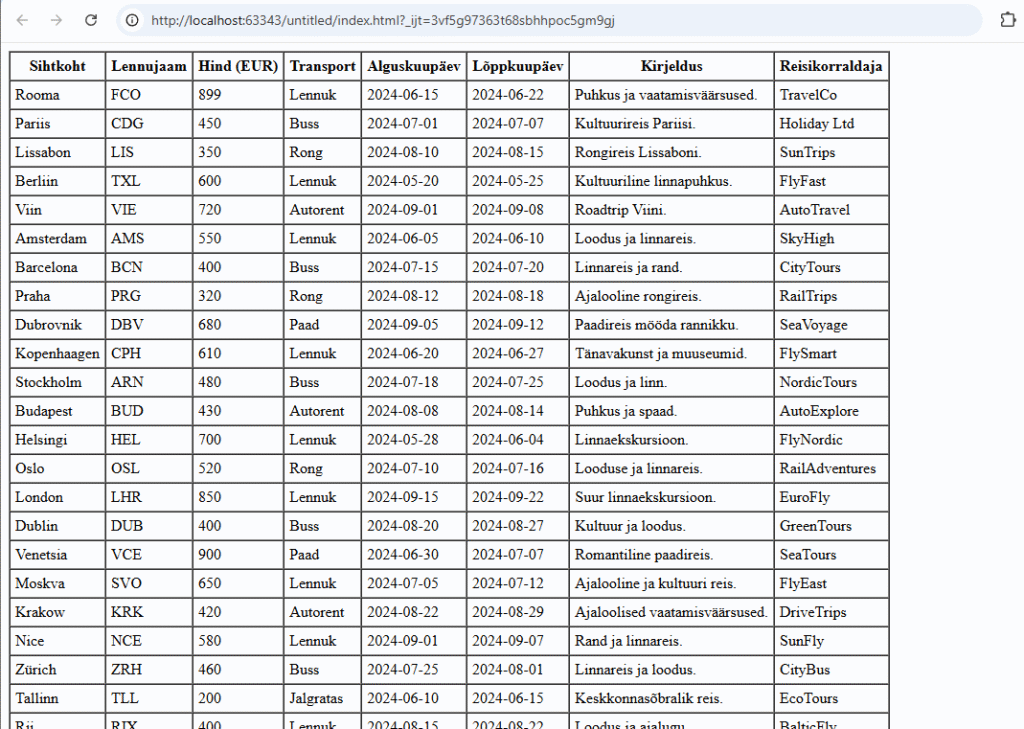
JSON andmete lugemine jQuery abi
<!DOCTYPE html>
<html lang="et">
<head>
    <meta charset="UTF-8">
    <meta name="viewport" content="width=device-width, initial-scale=1.0">
    <title>Reiside Info - JSON</title>
    <script src="//code.jquery.com/jquery-1.11.2.min.js"></script>
    <script>
        $(document).ready(function(){
            $.ajax({
                type: "GET",
                url: "autod.json",
                dataType: "json",
                success: kuvaJSON,
                error: vigaJSON
            });
        });

        function vigaJSON(){
            $("#container").append('<p style="color:red;">Probleemid JSON failiga!</p>');
        }

        function kuvaJSON(json){
            var table = '<table border="1" cellpadding="5" cellspacing="0">' +
                '<thead>' +
                '<tr>' +
                '<th>Sihtkoht</th>' +
                '<th>Lennujaam</th>' +
                '<th>Hind (EUR)</th>' +
                '<th>Transport</th>' +
                '<th>Alguskuupäev</th>' +
                '<th>Lõppkuupäev</th>' +
                '<th>Kirjeldus</th>' +
                '<th>Reisikorraldaja</th>' +
                '</tr>' +
                '</thead>' +
                '<tbody>';

            $.each(json.Reis, function(index, reis){
                var sihtkoht = reis.Sihtkoht;
                var lennujaam = reis.Lennujaam;
                var hind = reis.Hind;
                var alguskuupaev = reis.Transport.Alguskuupäev;
                var kirjeldus = reis.Transport.Kirjeldus;
                var loppkuupaev = reis.Lõppkuupäev;
                var reisikorraldaja = reis.Reisikorraldaja;
                var transport = reis.Transport['@attributes'].type;

                table += '<tr>' +
                    '<td>' + sihtkoht + '</td>' +
                    '<td>' + lennujaam + '</td>' +
                    '<td>' + hind + '</td>' +
                    '<td>' + transport + '</td>' +
                    '<td>' + alguskuupaev + '</td>' +
                    '<td>' + loppkuupaev + '</td>' +
                    '<td>' + kirjeldus + '</td>' +
                    '<td>' + reisikorraldaja + '</td>' +
                    '</tr>';
            });

            table += '</tbody></table>';
            $("#container").append(table);
        }
    </script>
</head>
<body>
<div id="container">
</div>
</body>
</html>
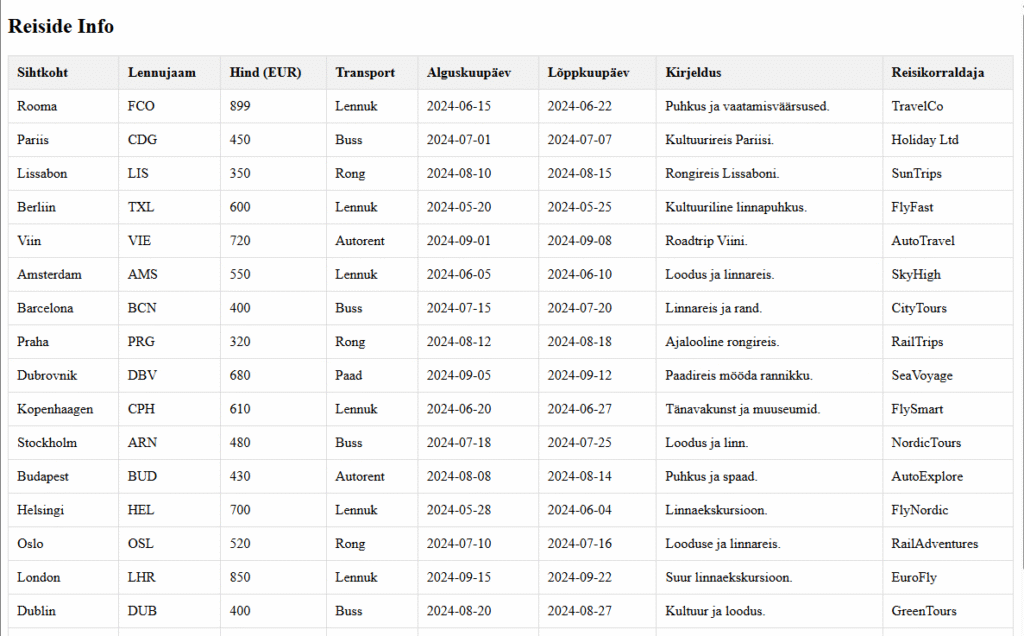
PHP + JSON veebileht
<?php
$json = file_get_contents('autod.json');
$data = json_decode($json, true);
?>

<!DOCTYPE html>
<html lang="et">
<head>
    <meta charset="UTF-8">
    <meta name="viewport" content="width=device-width, initial-scale=1.0">
    <title>Reiside Info</title>
    <style>
        table {
            width: 100%;
            border-collapse: collapse;
        }
        th, td {
            padding: 10px;
            border: 1px solid #ddd;
            text-align: left;
        }
        th {
            background-color: #f2f2f2;
        }
    </style>
</head>
<body>

<div id="container">
    <h2>Reiside Info</h2>
    <table>
        <thead>
        <tr>
            <th>Sihtkoht</th>
            <th>Lennujaam</th>
            <th>Hind (EUR)</th>
            <th>Transport</th>
            <th>Alguskuupäev</th>
            <th>Lõppkuupäev</th>
            <th>Kirjeldus</th>
            <th>Reisikorraldaja</th>
        </tr>
        </thead>
        <tbody>
        <?php
        foreach ($data['Reis'] as $reis) {
            $transportType = isset($reis['Transport']['@attributes']['type']) ? $reis['Transport']['@attributes']['type'] : 'Не указано';

            echo "<tr>";
            echo "<td>" . htmlspecialchars($reis['Sihtkoht']) . "</td>";
            echo "<td>" . htmlspecialchars($reis['Lennujaam']) . "</td>";
            echo "<td>" . htmlspecialchars($reis['Hind']) . "</td>";
            echo "<td>" . htmlspecialchars($transportType) . "</td>";
            echo "<td>" . htmlspecialchars($reis['Transport']['Alguskuupäev']) . "</td>";
            echo "<td>" . htmlspecialchars($reis['Lõppkuupäev']) . "</td>";
            echo "<td>" . htmlspecialchars($reis['Transport']['Kirjeldus']) . "</td>";
            echo "<td>" . htmlspecialchars($reis['Reisikorraldaja']) . "</td>";
            echo "</tr>";
        }
        ?>
        </tbody>
    </table>
</div>

</body>
</html>
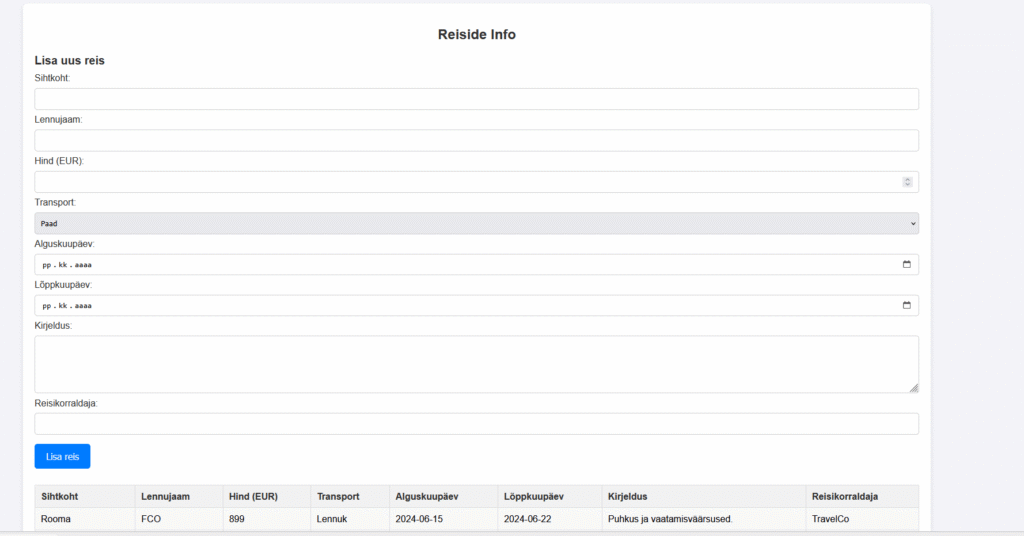
Lisame CSS ja teeme võimalus lisada uued andmed
if ($_SERVER['REQUEST_METHOD'] === 'POST') {
    $newReis = [
        "@attributes" => ["id" => (count($data['Reis']) + 1)],
        "Sihtkoht" => $_POST['sihtkoht'],
        "Lennujaam" => $_POST['lennujaam'],
        "Hind" => $_POST['hind'],
        "Transport" => [
            "@attributes" => ["type" => $_POST['transport']],
            "Alguskuupäev" => $_POST['alguskuupaev'],
            "Kirjeldus" => $_POST['kirjeldus']
        ],
        "Lõppkuupäev" => $_POST['loppkuupaev'],
        "Reisikorraldaja" => $_POST['reisikorraldaja']
    ];


    $data['Reis'][] = $newReis;

    file_put_contents($jsonFile, json_encode($data, JSON_PRETTY_PRINT));

    header('Location: ' . $_SERVER['PHP_SELF']);
    exit();
}